Block Program Demo
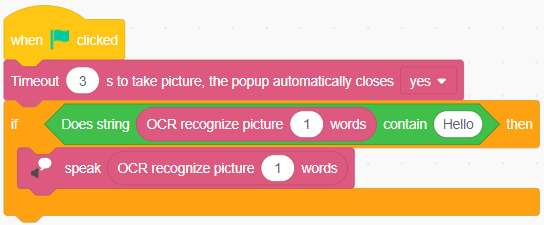
1. Description: Place the pictures to be recognized under the camera. Start running the program. The camera takes pictures automatically after three seconds. If "Hello" is detected in the picture, then "Hello" will be broadcasted.
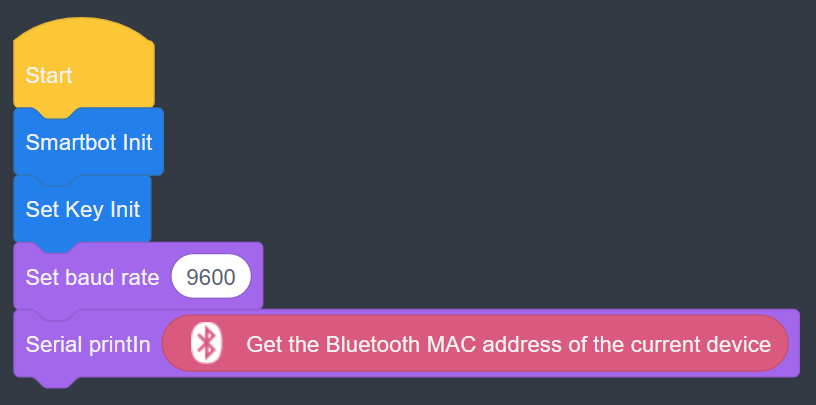
2. Description: Click Upload Code to upload the script to the AIStarter. After successful upload, open the serial debugging tool, select the correct COM port and set the baud rate to 9600. Once the serial debugging tool is configured, start monitoring. Run the uploaded script on the AIStarter, and the serial debugging tool will print the car's MAC address.
3. Description: On the AIStarter interface, click Upload Code to upload the program to the AIStarter. Press the button on the AIStarter to run the program, then run the Magic Box program online or click Download to load the program onto the Magic Box for offline execution.
 Magic Box Magic Box |
 AIStarter AIStarter |
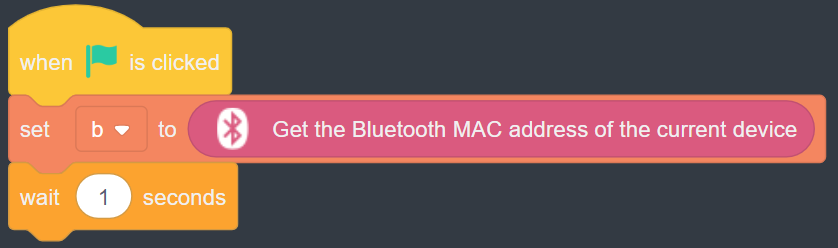
4. Description: When running the script online, variable b displays the Bluetooth MAC address of the Magic Box.
5. Description: Run the master/slave Magic Box program online or offline (via download) in both the DobotLab client and web browser, and establish Bluetooth communication.
 Master station Magic Box Master station Magic Box |
 Slave station Magic Box Slave station Magic Box |